The Curiosity Shop: Difference between revisionsGive feedback
m →Base Shop: added punctuation |
→Shop Locations: New map image |
||
| (58 intermediate revisions by 26 users not shown) | |||
| Line 1: | Line 1: | ||
[[File:Shop Logo.png|317x317px|thumb|link=|Shop logo]]{{Quotation|The Shopkeeper|You want hexes? We got hexes! You need bullets? We got bullets! You need a Reuben? Find a deli, because in the Curiosity Shop, we deal in power and tchotchkes!}}'''The Curiosity Shop''' is the place players go to purchase various [[items]] from the [[Shopkeeper]]. | |||
'''The Curiosity Shop''' is the place | |||
== Overview == | == Overview == | ||
[[File: | [[File:The Curiosity Shop in-game.png|thumb|316x316px|alt=Curiosity Shop|The Curiosity Shop in-game.]] | ||
The Curiosity Shop is the main form of progression in matches of ''[[Deadlock]]'', giving players access to dozens of powerful items available for the player to purchase using [[ | The Curiosity Shop is the main form of progression in matches of ''[[Deadlock]]'', giving players access to dozens of powerful [[items]] available for the player to purchase using {{Souls}} [[Souls]]. These items provide a variety of different stat increases and bonuses for the player, modifying things like ammo, fire rate, damage of abilities and weapons, ability range and cooldowns, movement speed, etc, along with passive buffs and additional active abilities. | ||
[[Items]] are split into three categories; the two damage types, [[Weapon]] and [[Spirit]], and [[Vitality]] for defense. | |||
= | These shops are scattered throughout the [[map]] with one at each base, towards mid on both teams sides, along with every lane's first [[Guardian|Guardians]], although these close after the Guardian is killed. They can be found by heading towards the shop icon on the minimap ([[File:MinimapShopIcon.png|24px|link=]]). Players can interact with shops by standing in front of them within the small yellow rectangle and pressing their open shop keybind. | ||
Every hero also has a set of items in their Default build separated into sections for the [[Strategy|early, mid, and late game]] as determined by the developers. Players are also capable of creating and sharing their own builds for each hero. | |||
Some items are components, which can be upgraded into more expensive items with improved effects. | |||
== Functions == | == Functions == | ||
[[File:Weapon shop.png|thumb|Shop UI]] | |||
=== Buying === | === Buying === | ||
Items can be purchased using Souls and are separated into 4 different tiers based on their price: 800, 1,600, 3,200 and 6,400. Items with components can be bought in their entirety or get upgraded into from their components for their price minus the Souls already spent on the components. | |||
Items can be purchased using | |||
=== Selling === | === Selling === | ||
Items can be sold back to the shop for half of the initial amount of | Items can be sold back to the shop for half of the initial amount of Souls spent on them, or entirely refunded if the player has not left the shop area after first purchasing an item, freeing up item slots for the player. | ||
=== Imbuing === | === Imbuing === | ||
When certain items are purchased the player is prompted to imbue one of their hero's abilities, giving them an additional bonus in the stat that item is improving. For example, when buying | When certain items are purchased, the player is prompted to [[Imbue|imbue]] one of their hero's abilities, giving them an additional bonus in the stat that item is improving. For example, when buying {{ItemIcon|Surge Of Power}}, one ability can be chosen to have extra [[Spirit Power]], allowing for further ability specialization. | ||
=== Active Items === | |||
When buying an Active Item, players are prompted to place it into one of 4 ability slots in addition to their normal item slots. Players can only have a maximum of 4 Active Items in their inventory at a time, even if they have open item slots available to purchase more. Once a player has 4 Active Items, no more Active Items can be purchased until an Active Item is sold. | |||
=== Shop Bonus === | |||
{{Main|Item#Item Types|l1=Item Types}} | |||
When buying items, the player gains bonus stats related to the item's category: [[Weapon Damage]] for [[Weapon Item|Weapon]], [[Health]] for [[Vitality Item|Vitality]], and [[Spirit Power]] for [[Spirit Item|Spirit]]. | |||
== Shop Locations == | == Shop Locations == | ||
[[File: | [[File:Shops map.png|thumb|Shop locations.]] | ||
=== Base Shop === | === Base Shop === | ||
The base shop can be found at spawn. Unlike other shops, the buying radius | The base shop can be found at spawn. Unlike other shops, the buying radius extends to the whole area of the spawn room. Players can only buy items at their own base's shop. | ||
=== Side Shop === | === Side Shop === | ||
By every lane there is a side shop available | By every lane there is a side shop available, allowing quick purchases without leaving the lane. However, if the lane's Guardian is destroyed, the side shop closes and will not sell any items for the rest of the match. Players can only buy items at their own team's side shops; with the exception of {{HeroIcon|Rem}}, who can send his {{AbilityIcon|Lil Helpers}} to purchase queued items from any shop on the map (with the exception of either team's Base Shop). | ||
=== Secret Shop === | === Secret Shop === | ||
Both sides have their own secret shop, which can be found on either the | Both sides have their own secret shop, which can be found in an underground tunnel accessible by stairs or an open manhole. They are located midway between Broadway Street and the outside lanes. From the player's perspective, the secret shop on the right side of the map (Green for Hidden King and Yellow for Archmother) is in their teams' side. Both teams can access and make purchases from either secret shop. | ||
== Lore == | |||
The Curiosity Shop's item catalogs are provided by [[Fairfax Industries]], Mystic Pharmaceutical Stores, and the Curiosity Catalog. | |||
== Gallery == | |||
<gallery> | |||
File:BaseShop HiddenKing.png|The Curiosity Shop's appearance in the [[Hidden King]]'s base | |||
File:BaseShop Archmother.png|The Curiosity Shop's appearance in the [[Archmother]]'s base | |||
File:Shop_NP.png|alt=Neon Prime Shop|The Curiosity Shop's appearance in [[Neon Prime]] | |||
</gallery> | |||
== Trivia == | |||
* The side shops had wheels and tracks leading to each team's base, indicating that at one point in development they were supposed to move along the lanes. This was changed after the [[Map Rework]] update. | |||
* Before the {{Update link|October|2|2025}} update, Secret Shops temporarily closed when players from both teams were nearby. | |||
* The shape of the shop's minimap icon is more reminiscient of its [[Neon Prime|''Neon Prime'']] design. | |||
* The ''Team Fortress 2'' community map [https://wiki.teamfortress.com/wiki/Freaky_Fair Freaky Fair], released in the 2024 Scream Fortress update, has a parody of the Curiosity Shop called the "Upgrade Station", with [https://wiki.teamfortress.com/wiki/Merasmus Merasmus] as the Shopkeeper. | |||
== References == | |||
<references /> | |||
== Navigation == | |||
{{Navbox gameplay}} | |||
Latest revision as of 21:44, 17 July 2026

“You want hexes? We got hexes! You need bullets? We got bullets! You need a Reuben? Find a deli, because in the Curiosity Shop, we deal in power and tchotchkes!— The Shopkeeper
The Curiosity Shop is the place players go to purchase various items from the Shopkeeper.
Overview
[edit | edit source]
The Curiosity Shop is the main form of progression in matches of Deadlock, giving players access to dozens of powerful items available for the player to purchase using  Souls. These items provide a variety of different stat increases and bonuses for the player, modifying things like ammo, fire rate, damage of abilities and weapons, ability range and cooldowns, movement speed, etc, along with passive buffs and additional active abilities.
Items are split into three categories; the two damage types, Weapon and Spirit, and Vitality for defense.
These shops are scattered throughout the map with one at each base, towards mid on both teams sides, along with every lane's first Guardians, although these close after the Guardian is killed. They can be found by heading towards the shop icon on the minimap ( ). Players can interact with shops by standing in front of them within the small yellow rectangle and pressing their open shop keybind.
Every hero also has a set of items in their Default build separated into sections for the early, mid, and late game as determined by the developers. Players are also capable of creating and sharing their own builds for each hero.
Some items are components, which can be upgraded into more expensive items with improved effects.
Functions
[edit | edit source]
Buying
[edit | edit source]Items can be purchased using Souls and are separated into 4 different tiers based on their price: 800, 1,600, 3,200 and 6,400. Items with components can be bought in their entirety or get upgraded into from their components for their price minus the Souls already spent on the components.
Selling
[edit | edit source]Items can be sold back to the shop for half of the initial amount of Souls spent on them, or entirely refunded if the player has not left the shop area after first purchasing an item, freeing up item slots for the player.
Imbuing
[edit | edit source]When certain items are purchased, the player is prompted to imbue one of their hero's abilities, giving them an additional bonus in the stat that item is improving. For example, when buying  Surge of Power, one ability can be chosen to have extra Spirit Power, allowing for further ability specialization.
Active Items
[edit | edit source]When buying an Active Item, players are prompted to place it into one of 4 ability slots in addition to their normal item slots. Players can only have a maximum of 4 Active Items in their inventory at a time, even if they have open item slots available to purchase more. Once a player has 4 Active Items, no more Active Items can be purchased until an Active Item is sold.
Shop Bonus
[edit | edit source]- Main article: Item Types
When buying items, the player gains bonus stats related to the item's category: Weapon Damage for Weapon, Health for Vitality, and Spirit Power for Spirit.
Shop Locations
[edit | edit source]
Base Shop
[edit | edit source]The base shop can be found at spawn. Unlike other shops, the buying radius extends to the whole area of the spawn room. Players can only buy items at their own base's shop.
Side Shop
[edit | edit source]By every lane there is a side shop available, allowing quick purchases without leaving the lane. However, if the lane's Guardian is destroyed, the side shop closes and will not sell any items for the rest of the match. Players can only buy items at their own team's side shops; with the exception of  Rem, who can send his
  Lil Helpers to purchase queued items from any shop on the map (with the exception of either team's Base Shop).
Secret Shop
[edit | edit source]Both sides have their own secret shop, which can be found in an underground tunnel accessible by stairs or an open manhole. They are located midway between Broadway Street and the outside lanes. From the player's perspective, the secret shop on the right side of the map (Green for Hidden King and Yellow for Archmother) is in their teams' side. Both teams can access and make purchases from either secret shop.
Lore
[edit | edit source]The Curiosity Shop's item catalogs are provided by Fairfax Industries, Mystic Pharmaceutical Stores, and the Curiosity Catalog.
Gallery
[edit | edit source]-
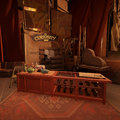 The Curiosity Shop's appearance in the Hidden King's base
 -
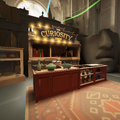 The Curiosity Shop's appearance in the Archmother's base
 -
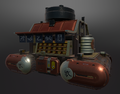 The Curiosity Shop's appearance in Neon Prime


Trivia
[edit | edit source]- The side shops had wheels and tracks leading to each team's base, indicating that at one point in development they were supposed to move along the lanes. This was changed after the Map Rework update.
- Before the October 2, 2025 update, Secret Shops temporarily closed when players from both teams were nearby.
- The shape of the shop's minimap icon is more reminiscient of its Neon Prime design.
- The Team Fortress 2 community map Freaky Fair, released in the 2024 Scream Fortress update, has a parody of the Curiosity Shop called the "Upgrade Station", with Merasmus as the Shopkeeper.
References
[edit | edit source]
Navigation
[edit | edit source]
| ||||||||||||||